
using open-webui for NON-fiction
free ebooks and open-webui

First the free eBooks than the bare bones tutorial.
You’ll need a GPU to do this. if you don’t know what a gpu is you probably need a new computer or not to get serious about ai dev.
install open-webui. on linux something like
pip install open-webuiyou can also install by docker but i prefer pip
no sudo apt install
from CLI : open-webui serve
create user account password and now the fun starts!
here’s some free ebooks in case you prefer that: the code follows
How to Learn the Chinese "Alphabet"!

Mastering Constitutional Law for the Multistate Bar Exam Multiple Choice Section

Business Associations, Agency, Partnership, Corporations Law Quiz Questions for Final Exams and Bar Review

THE ART OF WAR AND PEACE

Watergate 2.0

if you like it
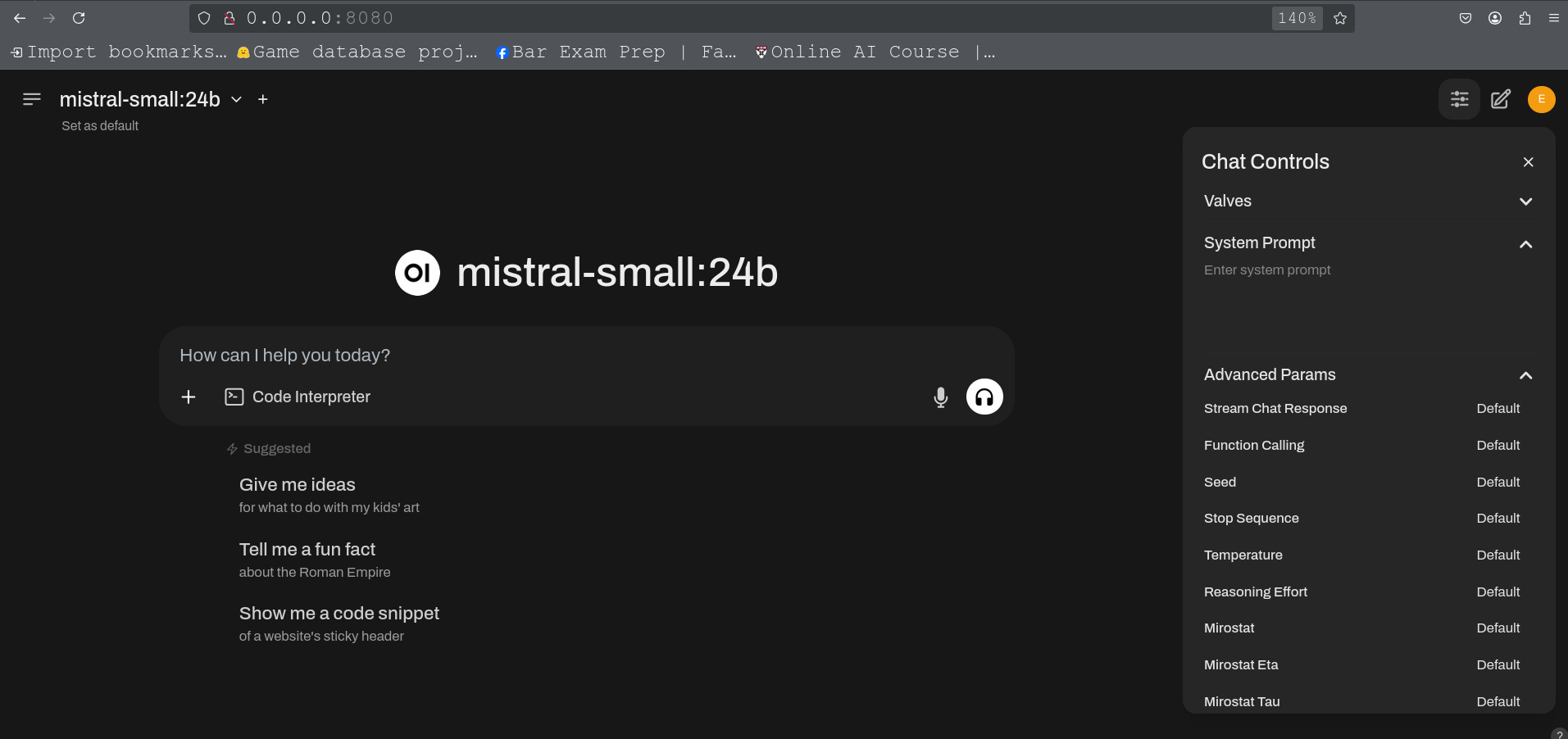
See those “default” chat controls. Yeah, this is where we are gonna do some fucking around. I presume you already installed a local language model or models with ollama and have a puter than can actually do this. if you don’t just
https://huggingface.co/chat/
Anyway presuming you have a puter with a GPU and can at least install and run a 4b model you can now change some of those default paramaters!
To optimize Open WebUI custom settings for non-fiction output, you can create a custom model with the following settings:
1. Base model: Choose a large, general-purpose model like GPT-4 or Claude 3.5 Sonnet as the foundation[4].
2. System prompt: Craft a prompt that emphasizes factual, well-researched responses. For example: "You are an AI assistant specialized in providing accurate, well-researched information on non-fiction topics. Always prioritize factual content and cite reliable sources when possible."
3. Temperature: Set a low temperature (around 0.1-0.3) to reduce randomness and increase focus on factual information[2].
4. Context length: Increase the default context length from 2048 to 4096 tokens or higher to allow for more detailed and comprehensive responses[3].
5. Top-k and Top-p: Adjust these parameters to narrow the range of token choices, promoting more focused and coherent outputs[4].
6. Knowledge base: Extend the model's knowledge by selecting relevant non-fiction documents or collections to include in its training data[1].
7. Tags: Add tags like "non-fiction," "factual," and "research-oriented" to easily identify the model's purpose[1].
8. Prompt suggestions: Include starter prompts that encourage users to ask for factual information or explanations on non-fiction topics[1].
After creating your custom model, make it the default for users or specific chats to ensure consistent non-fiction output across the platform[1].
Citations:
[1] https://documentation.suse.com/suse-ai/1.0/html/openwebui-configuring/index.html
[2] https://community.openai.com/t/force-api-response-to-be-in-non-english-language-how/175381
[3] https://github.com/open-webui/open-webui/discussions/6402
[4]
[5] https://documentation.suse.com/suse-ai/1.0/pdf/openwebui-configuring_en.pdf
[6] https://www.reddit.com/r/LocalLLaMA/comments/1dh1hcp/openwebui_is_absolutely_amazing/
[7] https://hostkey.com/blog/74-10-tips-for-open-webui-to-enhance-your-work-with-ai/
[8] https://github.com/open-webui/open-webui/discussions/3134